回声洞-开源html组件
ฅ^•ﻌ•^ฅ
这是回声洞的代码
准确来说,灵感是是来自PLC2的回声洞,也可以说是我抄了他们的创意,在可不可以叫剽窃?
但是它们的回声洞是真的好玩,所以才有了这一个突发奇想的也不能被称之为作品的东西.
诶嘿!
下面是html主代码,注意,js不可以跨域。
所以:
请将js文件和.json文件放在博客的托管服务器上。
确保你的markdown编译器支持html代码内嵌。
一切正常的话
让我们开始吧
html
<!DOCTYPE html>
<html lang="en">

<head>
  <meta charset="UTF-8">
  <meta name="viewport" content="width=device-width, initial-scale=1.0">
  <title>格言显示</title>
  <style>
    body {
      font-family: Arial, sans-serif;
      align-items: center;
      justify-content: center;
      min-height: 100vh;
      margin: 0;
    }
    #container {
      position: relative;
      border: 2px solid #dee2e6;
      padding: 20px;
      border-radius: 10px;
      box-shadow: 0 0 10px rgba(0, 0, 0, 0.1);
    }
    #quote-container {
      border: 2px solid #3498db;
      padding: 10px;
      border-radius: 8px;
      margin-bottom: 20px;
      background-color: #f8f9fa;
      position: relative;
    }
    #quote {
      font-size: 1.5em;
    }
    #button-container {
      margin-top: 20px;
    }
    button {
      background-color: #28a745;
      color: #fff;
      padding: 10px 20px;
      font-size: 1em;
      border: none;
      border-radius: 4px;
      cursor: pointer;
    }
    #quote-count {
      margin-top: 10px;
      color: #6c757d;
    }
    #loading {
      display: none;
      position: absolute;
      top: 0;
      left: 0;
      width: 100%;
      height: 100%;
      background-color: rgba(255, 255, 255, 0.8); /* 半透明白色背景 */
      justify-content: center;
      align-items: center;
      z-index: 1; /* 确保遮罩在最上层 */
      text-align: center; /* 将文本居中 */
    }
    .loader {
      border: 4px solid #f3f3f3;
      border-radius: 50%;
      border-top: 4px solid #3498db;
      width: 20px;
      height: 20px;
      animation: spin 1s linear infinite;
    }
    @keyframes spin {
      0% { transform: rotate(0deg); }
      100% { transform: rotate(360deg); }
    }
  </style>
</head>

<body>

  <div id="container">
    <div id="quote-container">
      <div id="loading">
        <div class="loader"></div>
        <div>加载中...</div>
      </div>
      <div id="quote">这里是回声显示的地方</div>
    </div>
    <div id="button-container">
      <button onclick="changeQuote()">再仔细听一下</button>
      <div id="quote-count">回声总数:0</div>
    </div>
  </div>

  <!-- 引入独立的JavaScript文件 -->
  <script src="https://blog.awaae001.top/script.js"></script>

</body>

</html>
这是主代码
html部分,下面是js部分
js
// script.js

async function loadQuotes() {
  try {
    const response = await fetch('https://example.com/mian.json', {
      method: 'GET',
      mode: 'cors',
    });

    if (!response.ok) {
      throw new Error(`HTTP error! Status: ${response.status}`);
    }

    const data = await response.json();
    return data.quotes;
  } catch (error) {
    console.error('获取格言时出错:', error.message);
    return [];
  }
}

let quotes;  // 存储加载的格言数组
let currentQuoteIndex;  // 当前显示的格言索引

// 初始化加载格言数据
loadQuotes().then(data => {
  quotes = data;
  updateQuoteCount(); // 初始化显示格言总数
  changeQuote();  // 初始显示格言
});

// 函数:切换显示随机格言
function changeQuote() {
  showLoading(); // 显示加载中动画

  // 模拟异步操作(例如加载新格言),这里使用setTimeout模拟1秒后的完成
  setTimeout(() => {
    // 生成一个随机索引
    const randomIndex = Math.floor(Math.random() * quotes.length);
    updateQuote(randomIndex);
    updateQuoteCount(); // 更新格言总数显示

    hideLoading(); // 隐藏加载中动画
  }, 640);
}

// 函数:更新显示的格言
function updateQuote(index) {
  const quoteElement = document.getElementById('quote');
  quoteElement.textContent = quotes[index];
}

// 函数:更新格言总数显示
function updateQuoteCount() {
  const quoteCountElement = document.getElementById('quote-count');
  quoteCountElement.textContent = '总格言数:' + quotes.length;
}

// 函数:显示加载中动画
function showLoading() {
  const loadingElement = document.getElementById('loading');
  loadingElement.style.display = 'block';
}

// 函数:隐藏加载中动画
function hideLoading() {
  const loadingElement = document.getElementById('loading');
  loadingElement.style.display = 'none';
}
其中,你需要将example.com的内容替换为你自己的域名
你还可以建立一个.json文件来存储格言
json
{
  "quotes": [
    "只要是石头,到哪里都不会发光的。",
    "没有,过不去的坎,只有过不完的坎。",
    "现在苦点没关系,人只要活着就一定会有好事,发生在别人身上。",
    "黑夜从来不会亏待晚睡的人,它会赐予你黑眼圈,和即将猝死的身体。",
    "看时间不是为了起床,而是看还能睡多久。",
    "你必须敢爱敢恨,才会发现你的爱恨,别人真的不在乎。",
    "春节假期,从跳过早午餐开始。",
    "又到了一切矛盾,都能用「大过年的」四个字,解决的时候了。",
    "遇到喜欢的人就勇敢追求,这样你才能知道,拒绝你的人远不止一个。",
    "秀恩爱的最好在中午秀,因为,早晚都会有报应。",
    "梦想还是要有的,万一见鬼了呢?",
    "好看的皮囊千篇一律,有趣的灵魂两百多斤。",
    "别看我挣的少,但是我省的多,昨天法拉利又省下两百多万。",
    "如果人生是一部电影,那你就是,中间弹出来的广告。",
    "出卖灵魂并不丢人,丢人的是,没能卖一个好价钱。",
    "不是我长大变傻了,而是傻子长大了"
  ]
}
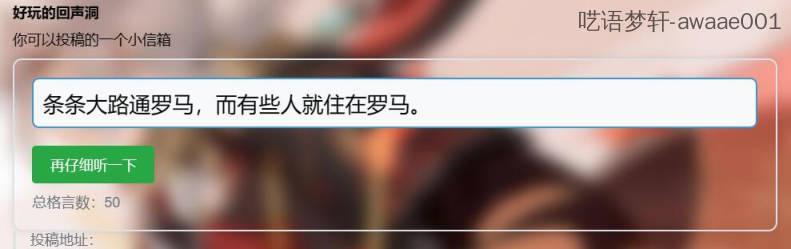
大概的效果长这样
ฅ^•ﻌ•^ฅ